


Accounting Automation · E-Invoicing & Compliance · Guides & How-tos
What happens on the recipient side in the Peppol network?

In our previous articles, we explained how the Peppol network works, what the Digital Postman does, and how an invoice moves from the supplier through an Access Point into the Peppol network.
Today, we will look at the final part of the process: Corner 4, also known as C4.
C4 represents the recipient’s system. This can be an ERP system, accounting software, expense management system, approval workflow solution, archiving system, or the company’s internal accounting solution. For most companies, this is often the most important part of the whole process, because it determines how efficiently the business can actually work with an electronic invoice.
Many companies think of e-invoicing only as sending an XML document. In reality, the process is much broader. The biggest value of process digitalisation is created on the recipient side. When a company can process a received invoice automatically, without manual work, that is where the largest savings in time and cost appear.
What happens after the invoice is delivered?
Once an invoice is delivered through the Peppol network, the Digital Postman or Access Point forwards it to the recipient’s system. But the process does not end there. In fact, this is where the most important part of automation begins.
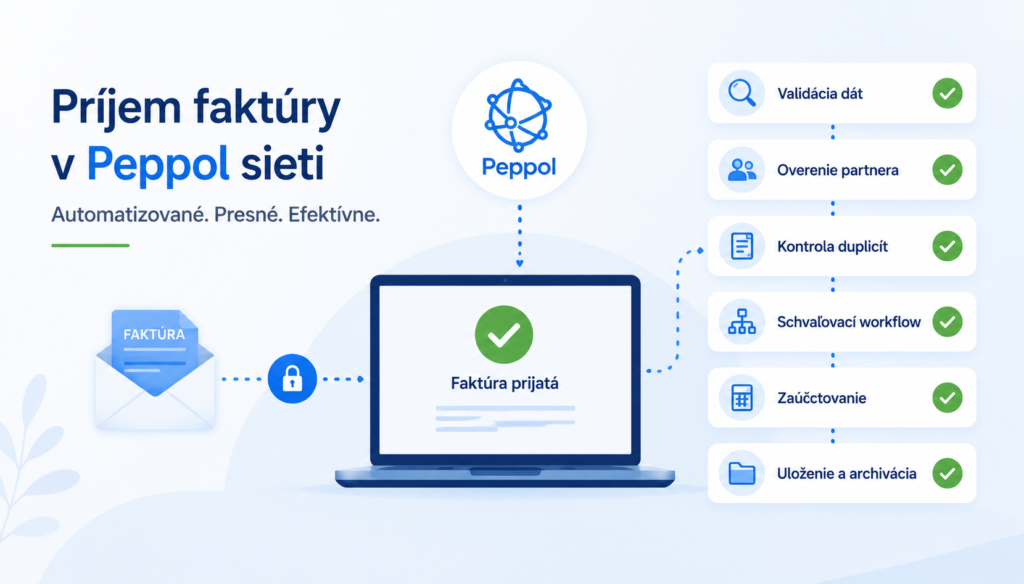
After receiving the invoice, modern systems can perform several steps automatically. First, the invoice is validated. This means checking whether the data is correct, whether all mandatory fields are included, and whether the invoice follows the required format.
The system can then verify the business partner, check the VAT ID, identify a purchase order, or compare the invoice data with existing records.
Duplicate invoice detection is also very important. The system can recognise whether the same invoice has already been received or processed, reducing the risk of errors and double posting.
After successful validation, the invoice can be automatically posted to the ERP system or sent into an approval workflow. It can be assigned to the right department, project, or approver. Once approved, the document can be stored in an electronic archive and prepared for further reporting.
In practice, this means the company no longer needs to manually copy data from PDF invoices or check basic errors by hand.
XML is not made for people to read
It is important to understand that Peppol BIS XML is not primarily designed as a human-readable document. It is structured data created for systems.
A traditional PDF invoice is suitable for visual display, but the system first needs to “read” the information from it. That is why many companies today use OCR or AI technologies to extract data from documents.
With an XML invoice, this problem disappears. All data is stored in a clearly defined structure. The ERP system knows exactly where to find the supplier, amount, VAT, purchase order number, or individual line items.
A modern ERP system can therefore:
- automatically identify the supplier
- read invoice line items
- recognise VAT rates
- post the document
- prepare it for approval
- send it to the archive
And all of this can happen without manual user input.
That is why it is important for companies to start analysing their internal systems before e-invoicing becomes mandatory.
Not all ERP systems are ready
In practice, companies use many different ERP and accounting systems. Some already support Peppol or UBL 2.1, while others still work mainly with PDFs or proprietary formats.
Many companies may discover that their system can export invoices, but cannot properly receive or process them automatically. Often, the missing parts are an API, approval workflow, or the ability to automatically import XML documents.
That is why we recommend checking:
- whether your ERP system supports XML invoice import
- which formats it can process
- whether an API or integration interface is available
- how invoice approval works today
- whether the system supports automatic posting
- how electronic archiving will be handled
Companies should also start talking to their ERP providers. It is important to understand whether the system will need an upgrade, a new licence, or an additional e-invoicing module.
Automation creates the biggest value
Much of the current discussion around e-invoicing focuses on legislation. But the real business value lies in automating internal processes.
If a company receives hundreds or thousands of invoices every month, manual processing creates high personnel costs and increases the risk of errors. Employees need to check data, copy it between systems, send invoices for approval, and archive documents afterwards.
This type of process is often slow, difficult to control, and problematic during audits or inspections.
With a well-designed integration, the system can process a large share of invoices automatically. Employees can then focus only on exceptions or problematic documents.
Modern solutions can support:
- AI-based document recognition
- automatic purchase order matching
- approval workflows
- budget checks
- audit trails
- electronic archiving
- export to accounting
- document status monitoring
The result is faster processing, fewer errors, and better visibility across the full invoice lifecycle.
What role will the Digital Postman play?
The Digital Postman will not only be used for sending invoices.
In many cases, it will act as an integration layer between the ERP system and the state or Peppol network. This means it will manage communication between the company’s internal system and external platforms.
The Digital Postman may support:
- data transformation into the correct XML format
- document validation
- invoice routing
- status monitoring
- error messages
- archiving
- ERP integrations
- workflow processing
- API communication
- audit logs and traceability
This is why choosing the right partner will be important. Companies should check whether the provider understands ERP integrations, security, Peppol standards, and Slovak legislative requirements.
What should companies do today?
The biggest mistake will be waiting until the last minute.
Although 2027 may still seem far away, implementation and system preparation can take months. This is especially true for larger companies with several ERP systems, approval processes, or complex integrations.
Companies should already start to:
- analyse their ERP systems
- check XML invoice import options
- review how invoice approval works today
- identify automation opportunities
- prepare the integration architecture
- choose a partner or Digital Postman
We also recommend checking whether the company already has processes that could be automated today, even outside the legal e-invoicing requirement.
Companies with well-prepared systems do not need to worry about the introduction of mandatory e-invoicing. In the end, their daily work may not change dramatically, but their data will be cleaner, more accurate, and the whole process will become much more automated.
For companies that still rely mainly on PDF invoices and manual processing, however, 2026 may be the last real preparation window.
The technology is already ready. The real question is who will start preparing in time.